


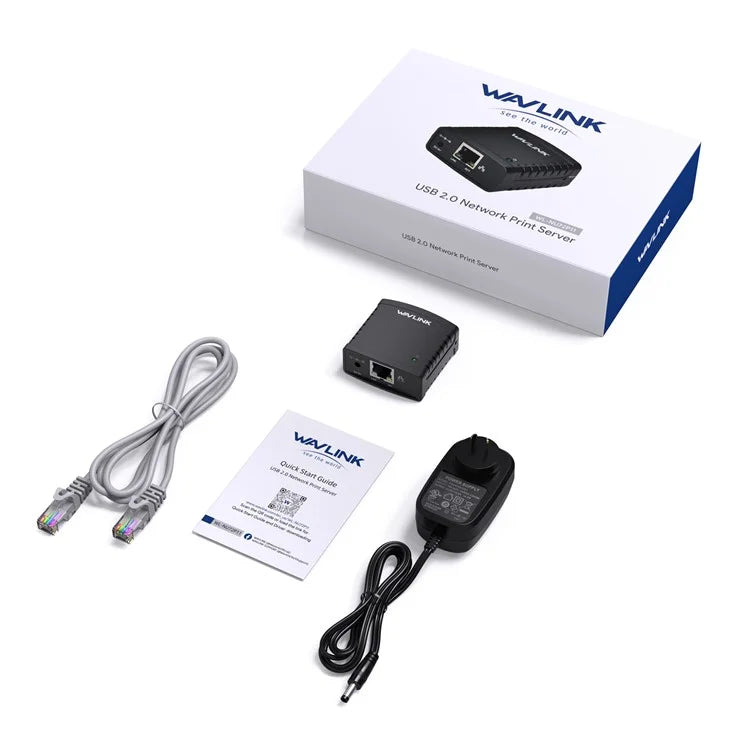
WAVLINK NU72P11 USB 2.0 Ethernet Network Printer Power Adapter 100Mbps Network Print Server
WAVLINK NU72P11 USB 2.0 Ethernet Network Printer Power Adapter 100Mbps Network Print Server
Wavlink brings technology to life: it's a convenient tool for sharing a USB printer with multiple computers. The built-in network management feature provides added convenience by allowing users to configure, monitor, and even reset the printer server through a web browser, which eliminates the need to keep the printer next to your computer. Print and save to any computer on your desk, the Printer Server saves space and eliminates cluttering your desk with multiple USB devices at home or in the office.
- USB2.0 Printer Server: USB Printer 10/100Mbps Ethernet Port, USB2.0 MFT Printing Shared LAN Network Printer
- Space-saving, time-saving, ideal solution for USB printer sharing: There is no need to have a dedicated computer to share printers. The NU78M41 allows you to print from any computer on your network, saving you the cost of owning a printer or the hassle of manually sharing a printer with multiple computers
- Energy Saving: Adopting a highly integrated chip with low power consumption, the NU78M41 greatly saves energy and reduces costs compared to traditional printers
- Web Management: Flexible Placement: The built-in web management feature provides added convenience by allowing users to configure, monitor, and even reset the print server through a web browser, which eliminates the need to place the printer next to a computer. Print jobs can even be sent to a printer in another country as easily as to a printer in the same office
- Easy to install: Compact and lightweight, the print server is easy to install with a simple setup wizard and web-based remote management. All you need to do is connect the print server to your printer's USB port using a USB cable and then connect it to the rest of the network using an RJ-45 network cable
- Supports LPR Network Printing and Bonjour Print Services: The printer server supports the Line Printer Remote (LPR) protocol to enable Internet printing. It also supports Bonjour Print Services, making it easier to find and configure printers on the network
Steps to use:
- 1. First, you need to use it on your LAN.
- 2. Second, install the driver, then open the driver and search for the device in the driver interface.
- 3. Click "Connect", and then you can turn on the printer after a successful connection.
Note:
- The setup is one-time. You do not have to run this process every time you want to print. If you delete the Setup Wizard, obviously it will no longer work.
- The printer or MFP installed and in use on your computer will be enabled to print with an automatic connection.
- Auto-disconnect printer devices may not work with storage devices such as pen drives, flash drives, etc.
- It is not compatible with Mac OS.
Free Shipping Across India
Enjoy FREE SHIPPING on every order, fully insured for your peace of mind.
Expect delivery within 3 - 5 depending on service location of the customer.
Payment & Security
We process your payment information securely. We do not store credit card details nor do we have access to your credit card information.
Missing/Wrong Items Guarantee
If you receive a parcel with missing, incorrect, or secondary packing items, please contact us within 7 days of delivery with relevant proof. StopShopSwipe India will assess the situation and provide resolution based on the extent of the damage.
Couldn't load pickup availability
Wavlink brings technology to life: it's a convenient tool for sharing a USB printer with multiple computers. The built-in network management feature provides added convenience by allowing users to configure, monitor, and even reset the printer server through a web browser, which eliminates the need to keep the printer next to your computer. Print and save to any computer on your desk, the Printer Server saves space and eliminates cluttering your desk with multiple USB devices at home or in the office.
- USB2.0 Printer Server: USB Printer 10/100Mbps Ethernet Port, USB2.0 MFT Printing Shared LAN Network Printer
- Space-saving, time-saving, ideal solution for USB printer sharing: There is no need to have a dedicated computer to share printers. The NU78M41 allows you to print from any computer on your network, saving you the cost of owning a printer or the hassle of manually sharing a printer with multiple computers
- Energy Saving: Adopting a highly integrated chip with low power consumption, the NU78M41 greatly saves energy and reduces costs compared to traditional printers
- Web Management: Flexible Placement: The built-in web management feature provides added convenience by allowing users to configure, monitor, and even reset the print server through a web browser, which eliminates the need to place the printer next to a computer. Print jobs can even be sent to a printer in another country as easily as to a printer in the same office
- Easy to install: Compact and lightweight, the print server is easy to install with a simple setup wizard and web-based remote management. All you need to do is connect the print server to your printer's USB port using a USB cable and then connect it to the rest of the network using an RJ-45 network cable
- Supports LPR Network Printing and Bonjour Print Services: The printer server supports the Line Printer Remote (LPR) protocol to enable Internet printing. It also supports Bonjour Print Services, making it easier to find and configure printers on the network
Steps to use:
- 1. First, you need to use it on your LAN.
- 2. Second, install the driver, then open the driver and search for the device in the driver interface.
- 3. Click "Connect", and then you can turn on the printer after a successful connection.
Note:
- The setup is one-time. You do not have to run this process every time you want to print. If you delete the Setup Wizard, obviously it will no longer work.
- The printer or MFP installed and in use on your computer will be enabled to print with an automatic connection.
- Auto-disconnect printer devices may not work with storage devices such as pen drives, flash drives, etc.
- It is not compatible with Mac OS.
Free Shipping Across India
Enjoy FREE SHIPPING on every order, fully insured for your peace of mind.
Expect delivery within 3 - 5 depending on service location of the customer.
Payment & Security
We process your payment information securely. We do not store credit card details nor do we have access to your credit card information.
Missing/Wrong Items Guarantee
If you receive a parcel with missing, incorrect, or secondary packing items, please contact us within 7 days of delivery with relevant proof. StopShopSwipe India will assess the situation and provide resolution based on the extent of the damage.



Clutter-Free Setup
Charge All Your Essentials at Once: 3-in-1 Wireless Charging Stand for Phone, Watch, and Headphones.

Premium 100W Magnetic Charging Cable
Durable Aluminum with Self-Cleaning Design to Keep Your Space Organized