


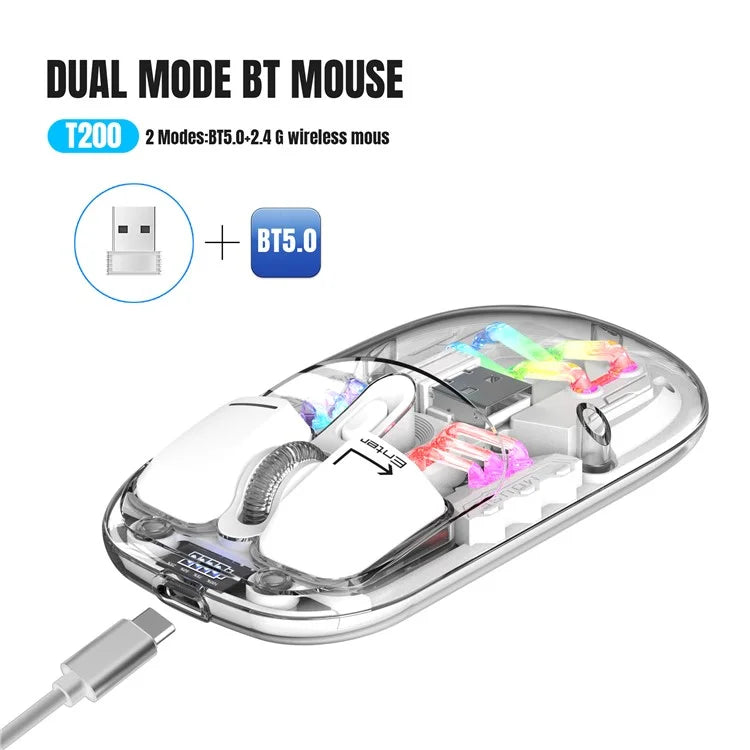
HXSJ T200 Wireless Bluetooth Mouse LED Rechargeable 2 Modes (Bluetooth + 2.4Ghz) Clear Ergonomic Mice
HXSJ T200 Wireless Bluetooth Mouse LED Rechargeable 2 Modes (Bluetooth + 2.4Ghz) Clear Ergonomic Mice
- Dual-channel 2.4G+Bluetooth connection, supports simultaneous connection to 2 devices, allowing for easy switching between them
- Made of transparent PC material, with a clear and luminous appearance, showcasing a high-end texture, making you stand out in the office
- Built-in 1600dpi three-speed adjustable sensor, precise operation, smooth scrolling, enhancing work efficiency
- 5 million times micro switch, mechanical keycap design, matte texture, fast rebound, and fast response
- Multiple RGB lighting modes, full of personality, creating a cool desktop atmosphere, making your workspace more vibrant
- Supports Type-C charging interface, fast and convenient charging, eliminating the hassle of tangled charging cables, making usage more convenient
- Built-in 400mAh large-capacity lithium battery, strong endurance, no need for frequent charging during long-term use, making your office life more convenient and worry-free
Specifications:
- Product model: T200
- IC model: Pix Art 3065
- Return rate: 125HZ
- Connection method: 2.4+BT5.0
- Lighting mode: RGB backlight (11 lighting modes)
- Mobile speed: 28IPS
- Refresh rate: 3000FPS
- Acceleration: 10G
- Number of buttons: 4 keys
- Key lifespan: 5 million times
- Operation mode: photoelectric
- Battery type: Built-in 400mAh rechargeable lithium battery
- DPI: 800-1200-1600dpi
- Mouse material: fully transparent PC material
- Roller material: silicone
- Battery display: 4-bar battery display key can be switched
- Wireless distance: 10 meters
- Charging interface: Type-C interface
- Charging cable length: 30cm
- Product size: 11.3x5.8x2.5cm
- Product weight: 72g
Operating System:
- For Windows Vista, Win7/8/10/11,for Mac OS X10.5 or later
Light Operation:
- 1. Open the mouse switch, after a successful connection, Press the bottom of the mouse Lighting mode switch key to turn on the light mode. “11 + 1” lighting modes can switch the light effect. Press and hold to turn off the light mode. Press and hold to switch “11” light effects.
- 2. When there is no action on the mouse within 10 minutes, the mouse will enter standby mode and all lights will be turned off.
- 3. After entering sleep mode, press any key to enter reconnection and the lights will automatically turn on.
Installation and Use Steps: (lower schematic):
- 1. 2.4G Wireless Connection Method:
- 2.4G-switch button to 2.4G mode, plug USB receiver, Blue light is flashing, mouse can use. Power off when the Switch is in the center of position.
- 2. BT5.0 Wireless Connection Method:
- BT mode-switch button to BT, blue light is flashing, pc will search BT5.0 automatically, and confirm it, then it can use; if you want to connect to another pc, please switch BT mode again and press left and middle keys 3 seconds at the same time, pc search BT signal and choose to connect.
Free Shipping Across India
Enjoy FREE SHIPPING on every order, fully insured for your peace of mind.
Expect delivery within 3 - 5 depending on service location of the customer.
Payment & Security
We process your payment information securely. We do not store credit card details nor do we have access to your credit card information.
Missing/Wrong Items Guarantee
If you receive a parcel with missing, incorrect, or secondary packing items, please contact us within 7 days of delivery with relevant proof. StopShopSwipe India will assess the situation and provide resolution based on the extent of the damage.
Couldn't load pickup availability
- Dual-channel 2.4G+Bluetooth connection, supports simultaneous connection to 2 devices, allowing for easy switching between them
- Made of transparent PC material, with a clear and luminous appearance, showcasing a high-end texture, making you stand out in the office
- Built-in 1600dpi three-speed adjustable sensor, precise operation, smooth scrolling, enhancing work efficiency
- 5 million times micro switch, mechanical keycap design, matte texture, fast rebound, and fast response
- Multiple RGB lighting modes, full of personality, creating a cool desktop atmosphere, making your workspace more vibrant
- Supports Type-C charging interface, fast and convenient charging, eliminating the hassle of tangled charging cables, making usage more convenient
- Built-in 400mAh large-capacity lithium battery, strong endurance, no need for frequent charging during long-term use, making your office life more convenient and worry-free
Specifications:
- Product model: T200
- IC model: Pix Art 3065
- Return rate: 125HZ
- Connection method: 2.4+BT5.0
- Lighting mode: RGB backlight (11 lighting modes)
- Mobile speed: 28IPS
- Refresh rate: 3000FPS
- Acceleration: 10G
- Number of buttons: 4 keys
- Key lifespan: 5 million times
- Operation mode: photoelectric
- Battery type: Built-in 400mAh rechargeable lithium battery
- DPI: 800-1200-1600dpi
- Mouse material: fully transparent PC material
- Roller material: silicone
- Battery display: 4-bar battery display key can be switched
- Wireless distance: 10 meters
- Charging interface: Type-C interface
- Charging cable length: 30cm
- Product size: 11.3x5.8x2.5cm
- Product weight: 72g
Operating System:
- For Windows Vista, Win7/8/10/11,for Mac OS X10.5 or later
Light Operation:
- 1. Open the mouse switch, after a successful connection, Press the bottom of the mouse Lighting mode switch key to turn on the light mode. “11 + 1” lighting modes can switch the light effect. Press and hold to turn off the light mode. Press and hold to switch “11” light effects.
- 2. When there is no action on the mouse within 10 minutes, the mouse will enter standby mode and all lights will be turned off.
- 3. After entering sleep mode, press any key to enter reconnection and the lights will automatically turn on.
Installation and Use Steps: (lower schematic):
- 1. 2.4G Wireless Connection Method:
- 2.4G-switch button to 2.4G mode, plug USB receiver, Blue light is flashing, mouse can use. Power off when the Switch is in the center of position.
- 2. BT5.0 Wireless Connection Method:
- BT mode-switch button to BT, blue light is flashing, pc will search BT5.0 automatically, and confirm it, then it can use; if you want to connect to another pc, please switch BT mode again and press left and middle keys 3 seconds at the same time, pc search BT signal and choose to connect.
Free Shipping Across India
Enjoy FREE SHIPPING on every order, fully insured for your peace of mind.
Expect delivery within 3 - 5 depending on service location of the customer.
Payment & Security
We process your payment information securely. We do not store credit card details nor do we have access to your credit card information.
Missing/Wrong Items Guarantee
If you receive a parcel with missing, incorrect, or secondary packing items, please contact us within 7 days of delivery with relevant proof. StopShopSwipe India will assess the situation and provide resolution based on the extent of the damage.



Clutter-Free Setup
Charge All Your Essentials at Once: 3-in-1 Wireless Charging Stand for Phone, Watch, and Headphones.

Premium 100W Magnetic Charging Cable
Durable Aluminum with Self-Cleaning Design to Keep Your Space Organized