


HXSJ T16 Wireless Bluetooth Mouse 2 Modes (Bluetooth + 2.4Ghz) 4800 DPI Silent Computer Mouse
HXSJ T16 Wireless Bluetooth Mouse 2 Modes (Bluetooth + 2.4Ghz) 4800 DPI Silent Computer Mouse
- 2.4G+Bluetooth dual-mode wireless transmission technology, convenient to use
- 6-speed DPI adjustment design, 800-1200-1600-2400-3200-4800dpi
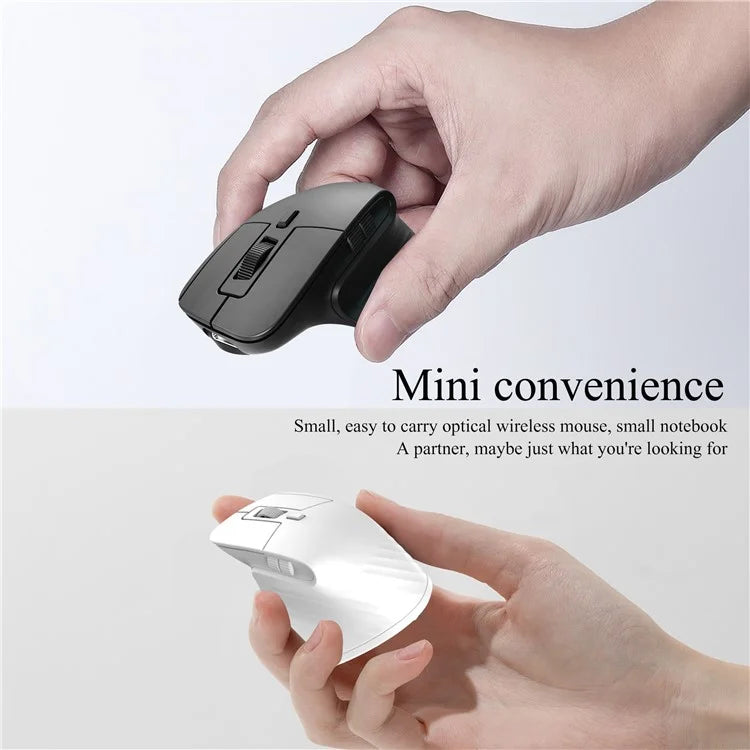
- The mouse is designed for portability, with a compact size and lightweight construction
- It has silent buttons, ensuring quiet operation and minimal disturbance
- The mouse includes a USB receiver for easy and fast setup
Specifications:
- Model: T16
- IC: Pix Art 3212
- Rate of return: 125HZ
- Movement speed: 30IPS
- Refresh rate: 4800FPS
- Acceleration: 10G
- Operation Mode: Opto-electronic
- Type: 2.4GHz/BT5.1
- Power Type: Rechargeable
- Number of keys: 4 keys
- Key life: 10 million switches
- Wireless distance: 10m
- Battery capacity: 180mAh
- DPI: 800-1200-1600-2400-3200-4800dpi
- Rated voltage/current: 3.7V / 15mA
- Product weight: 29.6g
- Product size: 7.6*5.2*3.1cm
Applicable System:
- In BT mode :
- For Windows (Windows XP / Vista / 7 / 8 / Server 2003 / 2000 / Win10, etc.), Android (Android 4.3 or above), for Mac OS (for Mac OS 10.10 above is recommended).
- In 2.4G mode:
- Suitable for desktop computers, notebook computers, smart TVs with USB interface, etc.
Sleep Mode:
- 1. After the mouse is stationary, it immediately goes to shallow sleep.
- 2. After 1.5 minutes of mouse rest.
- 3. Pause the mouse for 10 minutes to enter deep sleep.
Installation and Use Steps:
- USB 2.4G Mode Connection Steps:
- 1. Set the mouse switch to ON.
- 2. Plug the receiver into the computer's USB port. Press the mode button once. The red LED flashes and the installation is done automatically.
- BT Mode:
- Turn on the BT mode, light flashes quickly, indicating that the Bluetooth mode is activated and you can search for connections.
- BT Mouse 1 Mode Connection Steps:
- 1. Turn on the BT icon on your computer.
- 2. Turn on the mouse power switch, and press the mode switch 2 times, the second mode light turns blue and flashes quickly.
- 3. Enter BT Mouse 1 BT wireless connection mode for pairing.
- BT Mouse 2 Mode Connection Steps:
- 1. Turn on the BT icon on your computer.
- 2. Turn on the mouse power switch, Press the mode switch 3 times, and the third mode light turns green Flashing quickly.
- 3. Enter BT Mouse 2 Wireless connection mode to select pairing.
Note:
- If the blue and green lights are flashing slowly in Bluetooth mode, please press and hold the mode button for three seconds to activate Bluetooth mode. The light will flash quickly and Bluetooth can be searched and connected directly.
Free Shipping Across India
Enjoy FREE SHIPPING on every order, fully insured for your peace of mind.
Expect delivery within 3 - 5 depending on service location of the customer.
Payment & Security
We process your payment information securely. We do not store credit card details nor do we have access to your credit card information.
Missing/Wrong Items Guarantee
If you receive a parcel with missing, incorrect, or secondary packing items, please contact us within 7 days of delivery with relevant proof. StopShopSwipe India will assess the situation and provide resolution based on the extent of the damage.
Couldn't load pickup availability
- 2.4G+Bluetooth dual-mode wireless transmission technology, convenient to use
- 6-speed DPI adjustment design, 800-1200-1600-2400-3200-4800dpi
- The mouse is designed for portability, with a compact size and lightweight construction
- It has silent buttons, ensuring quiet operation and minimal disturbance
- The mouse includes a USB receiver for easy and fast setup
Specifications:
- Model: T16
- IC: Pix Art 3212
- Rate of return: 125HZ
- Movement speed: 30IPS
- Refresh rate: 4800FPS
- Acceleration: 10G
- Operation Mode: Opto-electronic
- Type: 2.4GHz/BT5.1
- Power Type: Rechargeable
- Number of keys: 4 keys
- Key life: 10 million switches
- Wireless distance: 10m
- Battery capacity: 180mAh
- DPI: 800-1200-1600-2400-3200-4800dpi
- Rated voltage/current: 3.7V / 15mA
- Product weight: 29.6g
- Product size: 7.6*5.2*3.1cm
Applicable System:
- In BT mode :
- For Windows (Windows XP / Vista / 7 / 8 / Server 2003 / 2000 / Win10, etc.), Android (Android 4.3 or above), for Mac OS (for Mac OS 10.10 above is recommended).
- In 2.4G mode:
- Suitable for desktop computers, notebook computers, smart TVs with USB interface, etc.
Sleep Mode:
- 1. After the mouse is stationary, it immediately goes to shallow sleep.
- 2. After 1.5 minutes of mouse rest.
- 3. Pause the mouse for 10 minutes to enter deep sleep.
Installation and Use Steps:
- USB 2.4G Mode Connection Steps:
- 1. Set the mouse switch to ON.
- 2. Plug the receiver into the computer's USB port. Press the mode button once. The red LED flashes and the installation is done automatically.
- BT Mode:
- Turn on the BT mode, light flashes quickly, indicating that the Bluetooth mode is activated and you can search for connections.
- BT Mouse 1 Mode Connection Steps:
- 1. Turn on the BT icon on your computer.
- 2. Turn on the mouse power switch, and press the mode switch 2 times, the second mode light turns blue and flashes quickly.
- 3. Enter BT Mouse 1 BT wireless connection mode for pairing.
- BT Mouse 2 Mode Connection Steps:
- 1. Turn on the BT icon on your computer.
- 2. Turn on the mouse power switch, Press the mode switch 3 times, and the third mode light turns green Flashing quickly.
- 3. Enter BT Mouse 2 Wireless connection mode to select pairing.
Note:
- If the blue and green lights are flashing slowly in Bluetooth mode, please press and hold the mode button for three seconds to activate Bluetooth mode. The light will flash quickly and Bluetooth can be searched and connected directly.
Free Shipping Across India
Enjoy FREE SHIPPING on every order, fully insured for your peace of mind.
Expect delivery within 3 - 5 depending on service location of the customer.
Payment & Security
We process your payment information securely. We do not store credit card details nor do we have access to your credit card information.
Missing/Wrong Items Guarantee
If you receive a parcel with missing, incorrect, or secondary packing items, please contact us within 7 days of delivery with relevant proof. StopShopSwipe India will assess the situation and provide resolution based on the extent of the damage.



Clutter-Free Setup
Charge All Your Essentials at Once: 3-in-1 Wireless Charging Stand for Phone, Watch, and Headphones.

Premium 100W Magnetic Charging Cable
Durable Aluminum with Self-Cleaning Design to Keep Your Space Organized